How to test your setup with VDO.Ninja
In preparation for a meeting or podcast recording, it is a good idea to test your setup before the meeting. A modern Chromium-based browser is recommended, and you will likely need to give the browser permission to use your audio and camera. A headset and quality microphone is also recommended.
Test with the following steps:
- Go to https://vdo.ninja/ and select “Create a Room”
- Click on the
 button to generate a new room name.
 - Click “Join the room as a Participant”.
- Join Room with Camera.
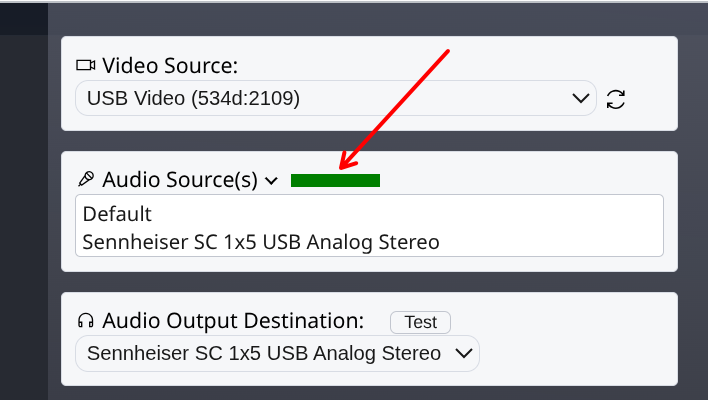
- Select your Video, Audio devices. Make sure the audio is directed to a headset, and the correct Mic is selected. If you select a computer microphone instead of a headset, the audio may be substandard.
- Click start. Your video should display.
- Click the settings button.

- Verify when you speak, the green audio level bar is moving.
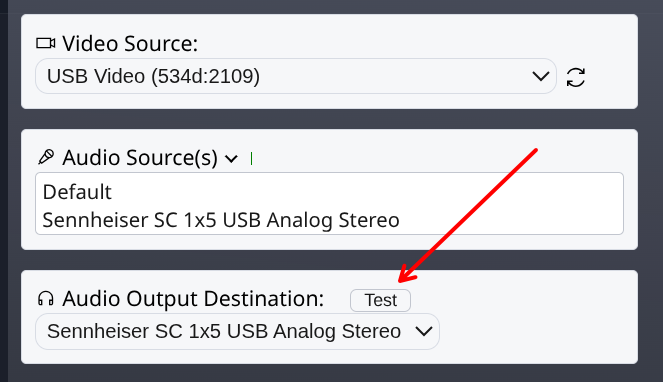
- Click the Audio Output Test button, and verify you hear the test sound.